Sedimentation of One Particle#
This example aims to numerically reproduce the results obtained by ten Cate et al. [1] for the E4 experiment. This experiment measures the velocity of a 1.5 cm particle settling in a container filled with a viscous fluid. The container is small enough to affect the sedimentation of the particle.
Warning
This case is a computationally expensive example. It can take several hours to run on a desktop computer.
Features#
Solvers:
lethe-fluid-sharp(with Q1-Q1)Transient problem
Displays the capability of the resolved CFD-DEM solver for the flow around one particle
Files Used in This Example#
All files mentioned below are located in the example’s folder (examples/sharp-immersed-boundary/sedimentation-1-particle).
Parameter file:
sedimentation-1-particle.prmExperimental velocity of ten Cate et al. [1] for the E4 experiment, digitized from the original figure:
ten-cate-E4.datPostprocessing Python script:
post-process-sedimentation-1-particle.py
Description of the Case#
The E4 experiment consists of the release of a particle made of Nylon (\(\rho_p=0.001120 \frac{\text{kg}}{\text{cm}^{3}}\)) with a diameter of 1.5 cm. The center of the particle is located 12.75 cm above the bottom of a \(10 \times 16 \times 10\) cm container. The viscosity of the fluid is \(\mu_f=0.00058 \frac{\text{kg}}{\text{s cm}}\) which is equivalent to \(\mu_f=0.058 \frac{\text{N s}}{\text{m}^{2}}\). The density of the fluid is \(\rho_f=0.000960 \frac{\text{kg}}{\text{cm}^{3}}\). The gravitational acceleration is \(g= -981 \frac{\text{cm}}{\text{s}^{2}}\). The particle accelerates due to gravity until it reaches the bottom of the container, shortly after which the simulation ends.
Note
You will note that we have transformed every length unit into centimeters. The reason is that the particle’s size is very close to 1 cm. Representing the problem in this way helps the linear solver convergence. It avoids extremely small values in the matrix due to the volume of cells being expressed in \(\text{cm}^{3}\) instead of \(\text{m}^{3}\).
All the container walls have no-slip boundary conditions except at the top of the container, where we define an open boundary.
Parameter File#
We explain every part of this parameter file in detail. In each section of the parameter file, we describe relevant parameters. The omitted parameters are only user preference parameters and do not impact the simulation results. For more detail, we suggest visiting the Parameters Guide.
Simulation Control#
subsection simulation control
  set method             = bdf2
  set bdf startup method = multiple_step_bdf
  set time step          = 0.0025 # Time step
  set time end           = 1.3    # End time of simulation
  set output name        = out    # Prefix for VTU outputs
  set output path        = out/   # Folder of the outputs
  set output frequency   = 1      # Frequency of simulation output
  set subdivision        = 1      # Mesh subdivision when output end
end
The
methodis set tobdf2to have a second-order time-stepping method. This ensures a low error due to the time discretization in this case.The
bdf startup methodis set tomultiple_step_bdf, as we do not have an initial solution that allows us to generate previous time steps. We use a multiple step BDF approach that ramps up the order of the scheme in the first few time steps.The
time stepis set to 0.0025. This ensures a low error due to the time discretization for this case.The
time endis set to 1.3. This is slightly longer than the experimental results of ten Cate et al. [1]. This ensures that the entire trajectory of the particle has been simulated.
Physical Properties#
subsection physical properties
  subsection fluid 0
    set kinematic viscosity = 0.6041666666666
    set density             = 0.000960
  end
end
The
kinematic viscosityis set to 0.6041666666666. This value is derived from the case description by dividing \(\mu_f\) by \(\rho_f\).
FEM#
subsection FEM
  set velocity degree = 1
  set pressure degree = 1
end
Here we use Q1-Q1 elements. This case is for demonstration purposes only; as such, we want a simulation that is not too costly to run.
Mesh#
subsection mesh
  set type               = dealii
  set grid type          = subdivided_hyper_rectangle
  set grid arguments     = 5,8,5: 0,0,0 : 10 , 16 ,10 : true
  set initial refinement = 1
end
The domain is a rectangular box, so we can directly use a subdivided hyper rectangle mesh from the deal.II library. In this case, we have oriented the y-direction with gravity. As such, the long side of the box is along this axis.
The
grid argumentsis set to5,8,5: 0,0,0 : 10 , 16 ,10 : true. This argument has three parts. First,5,8,5describes the initial subdivision of the box. This subdivision has been chosen as it is the coarsest mesh of the box with cubic elements. Second,0,0,0 : 10 , 16 ,10gives the two opposite corners of the rectangular box, (0,0,0) and (10,16,10). Finally,trueis a boolean that activates the colorization of the boundaries. This allows us to define separate boundary conditions at each side of the box.The
initial refinementis set to 1. This gives a base mesh with cells that are a bit smaller than the particle.
Mesh Adaptation#
subsection mesh adaptation
  # Fraction of coarsened elements
  set fraction coarsening = 0.3

  # Fraction of refined elements
  set fraction refinement = 0.05

  # How the fraction of refinement/coarsening are interpreted. Choices are
  # <number|fraction>.
  set fraction type = number

  # Frequency of the mesh refinement
  set frequency = 1

  # Maximum number of elements
  set max number elements = 750000

  # Maximum refinement level
  set max refinement level = 6
  # minimum refinement level
  set min refinement level = 0

  # Type of mesh adaptationChoices are <none|uniform|adaptive>.
  set type            = adaptive
  set error estimator = kelly

  # Variable for kelly estimationChoices are <velocity|pressure>.
  set variable = velocity
end
The
fraction coarseningis set to 0.3. This limits the accumulation of elements when the particle is moving. It allows the cells to be coarsened once the particle has moved away from them.The
fraction refinementis set to 0.05. The objective here is to refine elements that become close to the particle when it’s moving. This will mostly refine elements around the particle that are not included in the refinement zone around the particle. The refinement zone around the particle will be discussed in more detail in the IB particle section.The
frequencyis set to 1. Since the particle is moving at each time step, the refinement zone around it should be reevaluated at each time step.The
max refinement levelis set to 6. This parameter limits how small the elements around the particle can get, which limits the total number of elements in the problem. Here we limit the mesh size to 48 elements per diameter of the particle. This should be sufficient to get accurate results.The
typeis set toadaptive. Since the particle is moving and we do not want a uniform refinement of all the cells, we use thekellyerror estimator based on thevelocityvariable.
Boundary Conditions#
subsection boundary conditions
  set number = 6
  subsection bc 0
    set id   = 0
    set type = noslip
  end
  subsection bc 1
    set id   = 1
    set type = noslip
  end

  subsection bc 2
    set id   = 2
    set type = noslip
  end
  subsection bc 3
    set id   = 4
    set type = noslip
  end
  subsection bc 4
    set id   = 5
    set type = noslip
  end
  subsection bc 5
    set id   = 3
    set type = outlet
    set beta = 0
  end
end
Here we define a noslip boundary condition on the five walls of the box and an outlet on the boundary with id = 3, which is the top of the box. We refer the reader to the Boundary Conditions - CFD section on how those boundaries are defined.
Note
The boundary ids of a colorized deal.II rectangular mesh are numbered as follows: \(x_{min}=0\), \(x_{max}=1\), \(y_{min}=2\), \(y_{max}=3\), \(z_{min}=4\), \(z_{max}=5\).
Initial Conditions#
subsection initial conditions
  # Type of initial conditionChoices are <L2projection|viscous|nodal>.
  set type = nodal
  subsection uvwp
    set Function expression = 0; 0; 0;0
  end
end
The initial condition for this case is simple to define. At the start of the simulation, we assume that the particle and the fluid are at rest. From there, we define a uniform velocity field of 0 everywhere. To do that, we use type = nodal and set the function expression to 0 for all the velocity components and the pressure.
Non-linear Solver#
subsection non-linear solver
  subsection fluid dynamics
    set verbosity             = verbose
    set tolerance             = 1e-5
    set max iterations        = 10
    set force rhs calculation = true
  end
end
The
toleranceis set to 1e-5. This is small enough to ensure that the flow field is adequately resolved, as we expect a velocity of the particle of the order of 10 cm/s.The
max iterationsis set to 10. The objective here is to allow enough Newton iterations to converge to the tolerance, while limiting the time spent on a single time step if the system is too stiff.The
force rhs calculationis set totrue. This is the most important difference with most of the other examples. By default, the non-linear solver recalculates the RHS only after the update of the solution. Here, however, we need to evaluate it before every resolution of the linear system. To do so, we cannot use the RHS evaluated after the previous Newton iteration, because the particle position was updated between these two steps. This means that the RHS is evaluated twice per Newton iteration. The non-linear solver follows this sequence of steps for each Newton iteration:update the particle position
update the Jacobian matrix
update the RHS
solve the linear system
reevaluate the RHS to check the convergence
Linear Solver#
subsection linear solver
  subsection fluid dynamics
    set method                                = gmres
    set max iters                             = 200
    set relative residual                     = 1e-5
    set minimum residual                      = 1e-11
    set preconditioner                        = ilu
    set ilu preconditioner fill               = 0
    set ilu preconditioner absolute tolerance = 1e-12
    set ilu preconditioner relative tolerance = 1.00
    set verbosity                             = verbose
    set max krylov vectors                    = 200
  end
end
The
methodis set togmres. This solver is less computationally expensive than the other options, and this case does not require any special preconditioner. This makes thegmressolver with anilupreconditioner the best option available.The
max itersis set to 200. This is more than the number of iterations needed to solve the system.The
max krylov vectorsis set to the same number as the maximum solver iterations. This ensures that we keep the full Arnoldi basis for each new iteration. From experience, keeping all the Krylov vectors results in a faster resolution for this case than clearing the basis after a certain number ofgmresiterations.The
relative residualis set to 1e-5. This is small enough to avoid under-resolving the linear system, which would cause extra non-linear iterations, while not requiring too manygmresiterations.The
ilu preconditioner fillis set to 0. This is the cheapest option. In this case, we can use this option without having to do too manygmresiterations. It requires less computational time to do a few moregmresiterations than to build a more expensive preconditioner and do fewergmresiterations.
IB Particles#
subsection particles
  set assemble Navier-Stokes inside particles = false
  set number of particles                     = 1
  subsection extrapolation function
    set length ratio   = 2
    set stencil degree = 3
  end

  subsection local mesh refinement
    set initial refinement                = 6
    set refine mesh inside radius factor  = 0.8
    set refine mesh outside radius factor = 1.3
  end

  subsection DEM
    set particle nonlinear tolerance = 1e-5
    subsection gravity
      set Function expression = 0;-981;0
    end
  end

  subsection particle info 0
    set type             = sphere
    set shape arguments  = 0.75
    set integrate motion = true
    subsection position
      set Function expression = 5;12.75;5
    end
    subsection velocity
      set Function expression = 0;0;0
    end

    subsection physical properties
      set density = 0.001120
    end
  end
end
In this subsection, we define most of the parameters that are related to the particle.
The
number of particlesis set to one as we only want one particle.stencil degreeis set to 3, as this is the highest degree we can use in this case without leading to a Runge instability.refine mesh inside radius factorandrefine mesh outside radius factorare set to 0.8 and 1.3. The cells that have a degree of freedom between 0.8 and 1.3 times the radius of the particle from its center are refined. This creates a refined shell around the surface of the particle that avoids having hanging nodes in the calculation and ensures a small enough mesh around the particle.initial refinementis set to 6. Here we want to have the mesh as small as possible for the first time step. To achieve this, we refine every element with at least one vertex in the refinement zone around the particle 6 times before the simulation starts. This ensures that all the cells in the refinement zone around the particle are as small as possible. This number of refinements is 1 more than necessary. This is to avoid having part of the particle not properly refined as the initial mesh is big enough that some elements cut by the IB may not be properly detected at the beginning of the process. Doing one more refinement ensures that all the elements are properly refined.integrate motionis set to true because we are interested in the dynamics of the particle as it sediments in the rectangular box.assemble Navier-Stokes inside particlesis set to false because we are not interested in the flow inside of the particle.length ratiohas been set to 2. This is small enough not to impact the conditioning of the matrix too much, while avoiding the interpolation of the immersed boundary stencil in multiple elements.particle nonlinear tolerancehas been set to 1e-5. This is small enough to ensure that the particle dynamics are adequately resolved. We expect a velocity of the particle of the order of 10 cm/s.gravityFunction expressionis set to 0;-981;0 according to the definition of the case. As we chose the long axis of the rectangular box along the y-axis, we define gravity in this direction.
The following parameters are defined in the particle info 0 subsection.
positionFunction expressionis set to 5;12.75;5. This is the initial position of the particle according to the description of the case.velocityFunction expressionis set to 0;0;0. This is the initial velocity of the particle since it starts at rest.shape argumentsis set to 0.75, which is the radius of the sphere. This is according to the definition of the case where the particle has a diameter of 1.5 cm.densityis set to 0.001120. This is according to the definition of the case.
Running the Simulation#
Call lethe-fluid-sharp by invoking the following command:
to run the simulation using sixteen CPU cores. Feel free to use more CPU cores.
Warning
Make sure to compile Lethe in Release mode and run in parallel using mpirun. This simulation takes \(\sim \, 8\) hours on \(16\) processes.
Results#
In this section, we will briefly show some results of this simulation.
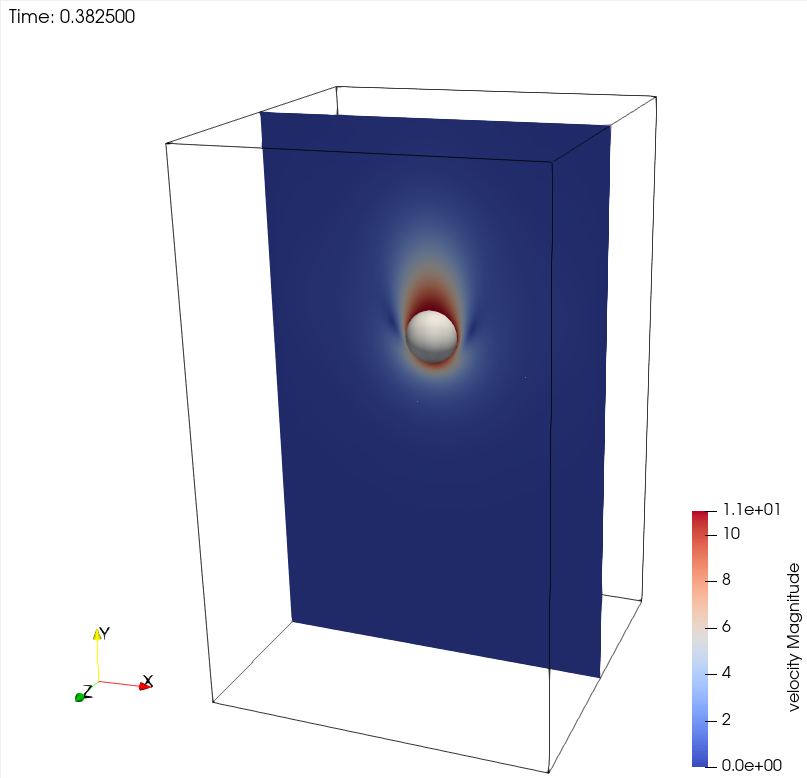
First, we look at a slice of the velocity profile during the acceleration phase.
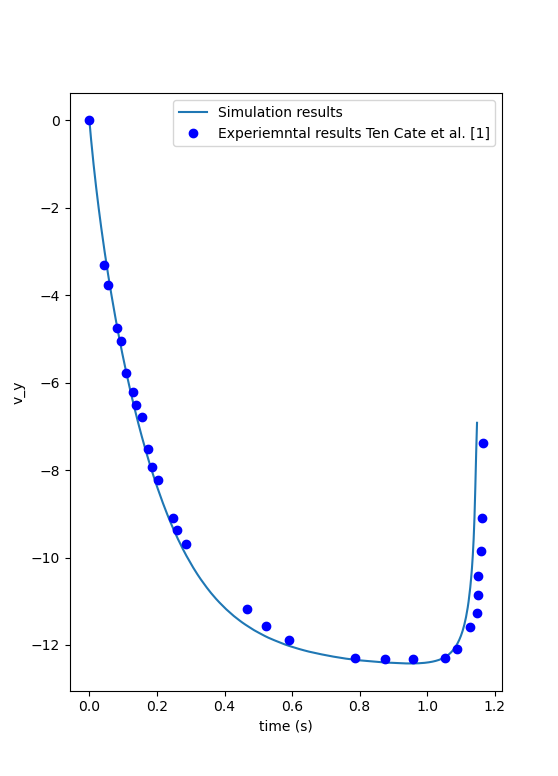
We can also compare the velocity of the particle in time with the measurements of ten Cate et al. [1]. A similar figure can be generated by launching the following command from the folder of the example, once the simulation is complete:
This script reads the velocity of the particle in out/ib_force.00.dat and the experimental data in ten-cate-E4.dat.